Komputer Pribadi (PC), Laptop, bahkan Handphone beroperating system (OS) pasti mempunyai kekurangan dan kelebihan masing-masing. Alhasil, orang-orang yang jahat biasanya menggunakan kekurangan pada suatu OS untuk merusak OS itu sendiri, bahkan hardware. Dipastikan hampir seluruh pengguna PC menginginkan komputernya aman dari virus. Tapi, jangan asal install anti virus, bisa jadi itu sumber utama virus di komputer Anda. Berikut adalah daftar anti virus Fake (palsu) yang beredar.
- Cyber Security
- Alpha Antivirus
- Windows Enterprise Suite
- Security Center
- Control Center
- Braviax
- Windows Police Pro
- Antivirus Pro 2010
- PC Antispyware 2010
- FraudTool.MalwareProtector.d
- Winshield2009.com
- Green AV
- Windows Protection Suite
- Total Security 2009
- Windows System Suite
- Antivirus BEST
- System Security
- Personal Antivirus
- System Security 2009
- Malware Doctor
- Antivirus System Pro
- WinPC Defender
- Anti-Virus-1
- Spyware Guard 2008
- System Guard 2009
- Antivirus 2009
- Antivirus 2010
- Antivirus Pro 2009
- Antivirus 360
- MS Antispyware 2009
- Antivirus Live
- Personal Security
- Cyber Security
- Alpha Antivirus
- Windows Enterprise Suite
- Security Center
- Control Center
- Braviax
- Windows Police Pro
- Antivirus Pro 2010
- PC Antispyware 2010
- FraudTool.MalwareProtector.d
- Winshield2009.com
- Green AV
- Windows Protection Suite
- Total Security 2009
- Windows System Suite
- Antivirus BEST
- System Security
- Personal Antivirus
- System Security 2009
- Malware Doctor
- Antivirus System Pro
- WinPC Defender
- Anti-Virus-1
- Spyware Guard 2008
- System Guard 2009
- Antivirus 2009
- Antivirus 2010
- Antivirus Pro 2009
- Antivirus 360
- MS Antispyware 2009
- IGuardPC or I Guard PC
- Additional Guard
- etc.
Nah, mulai sekarang berhati-hatilah menginstall anti virus. Percayakan hanya pada anti virus ternama seperti Avira, AVG, Norton, McAfee, Kaspersky, ESET, dsb. Dan berikut gambar icon dari 30 Fake Antivirus (anti virus palsu).
Salah satu cara untuk meremove fake anti virus :
 Banyak malware terkait dengan penjualan antivirus palsu berbedar di Internet. Pengguna internet secara tidak sengaja kadang memasukan program malware dalam bentuk antivirus palsu. Selanjutnya, si program palsu tersebut mulai memberikan peringatan adanya virus yang sebenarnya tidak ada alias palsu.
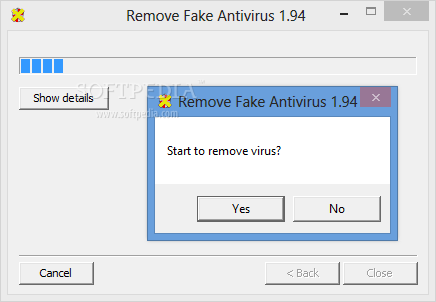
Dibawah ini nama nama program antivirus palsu yang dapat diberisikan oleh utility Remove Fake Antivirus Security Tool:
- Antivirus Live
- Personal Security
- Cyber Security
- Alpha Antivirus
- Windows Enterprise Suite
- Security Center
- Control Center
- Braviax
- Windows Police Pro
- Antivirus Pro 2010
- PC Antispyware 2010
- FraudTool.MalwareProtector.d
- Winshield2009.com
- Green AV
- Windows Protection Suite
- Total Security 2009
- Windows System Suite
- Antivirus BEST
- System Security
- Personal Antivirus
- System Security 2009
- Malware Doctor
- Antivirus System Pro
- WinPC Defender
- Anti-Virus-1
- Spyware Guard 2008
- System Guard 2009
- Antivirus 2009
- Antivirus 2010
- Antivirus Pro 2009
- Antivirus 360
- MS Antispyware 2009
- IGuardPC or I Guard PC
- Additional Guard
Bila komputer secara tidak sengaja memasukan program antivirus palsu. Dapat dibersihkan dengan Remove Fake Antivirus yang berukuran 160kb.


0 comments:
Post a Comment